

deepseek-flash as the default. Since the 17 October 2026 update it is, by the independent Artificial Analysis ranking, stronger than deepseek-v4-pro, answers faster and reads screenshots; and DeepSeek ran Terminal-Bench 4.0 in Claude Code itself. The numbers are in the DeepSeek Flash review. deepseek-v4-pro stays an option if it is clearly better on your own tasks.
Here’s how it works: RuAPI accepts Claude Code’s requests in Anthropic format (/v1/messages) and translates them into the DeepSeek format itself. To Claude Code it all looks like ordinary Claude — no proxy, no router needed.
This builds on the base Claude Code setup. If Claude Code isn’t installed yet, start there — this page only covers what changes for DeepSeek.
What you’ll need
- A RuAPI key (
sk-...) with a positive balance. Sign up at www.ruapi.ai; top up in USDT — see Top-up. - Claude Code installed —
claude --versionshould print a version number. Installation is on the Claude Code page.
You can copy ready-made settings from the Console. Open Console → API Keys, click Connect Claude Code, Cline & more, pick Claude Code and the
deepseek-flash model: the RuAPI address and your key are already filled in. Below is what each line means.
Console → API Keys: the “Connect Claude Code, Cline & more” button
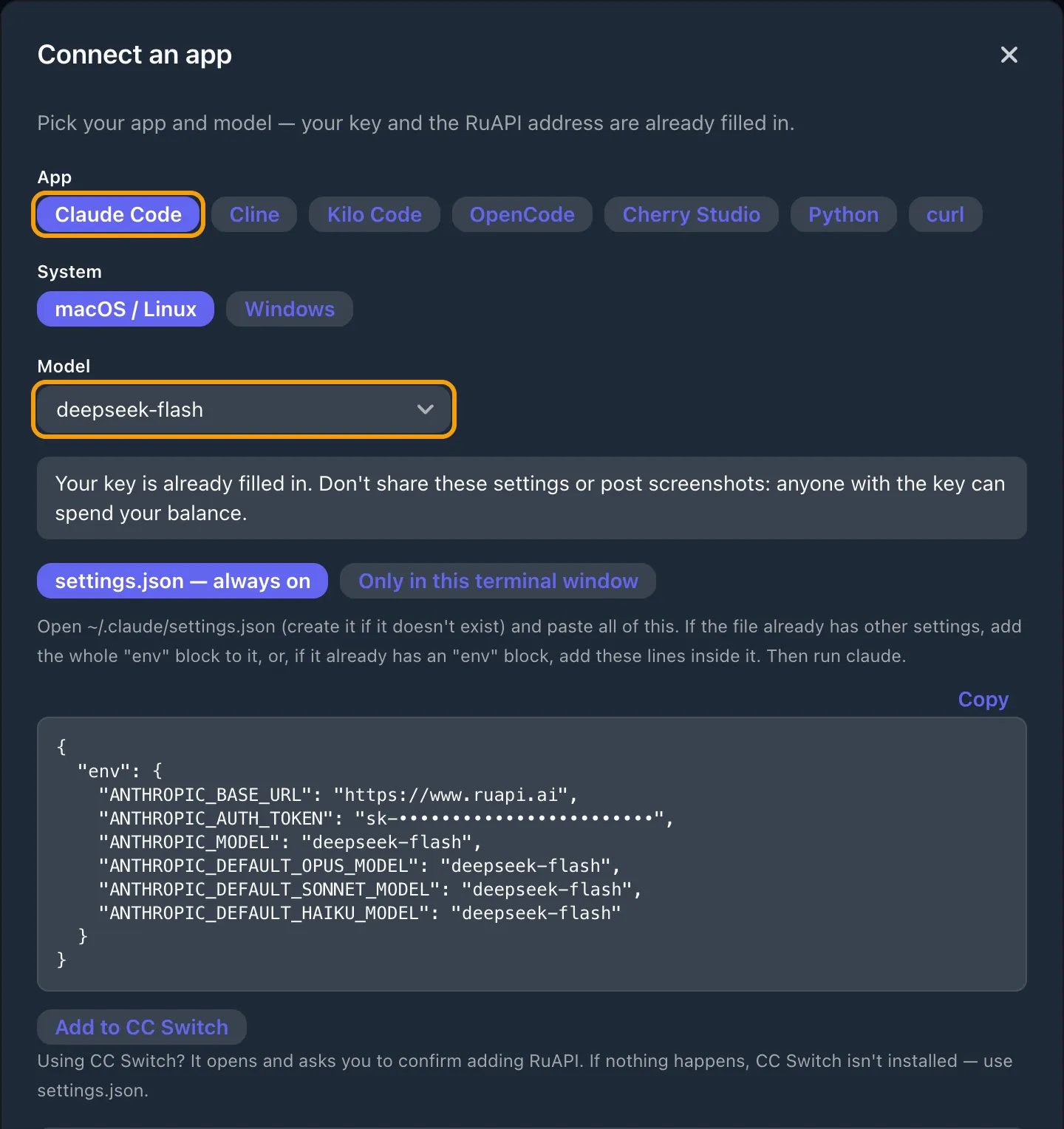
Claude Code with the deepseek-flash model: all four model fields are set to deepseek-flash (key hidden in the screenshot)
Setup
Open~/.claude/settings.json (on Windows, %USERPROFILE%\.claude\settings.json) and add:
deepseek-v4-pro in the model field, ANTHROPIC_DEFAULT_OPUS_MODEL and ANTHROPIC_DEFAULT_SONNET_MODEL (or just pick it in the /model menu); keep in mind it costs more and can’t read images.
What each field does
What each field does
deepseek-flash (or deepseek-v4-pro).
First run
Open a new terminal so the settings load, and go into a project:deepseek-flash (not Claude) and the tokens it spent — that’s your confirmation it’s going through DeepSeek.
What to expect
- Tools work. Reading and editing files, running commands, searching the project — Claude Code’s whole agent loop runs through DeepSeek.
- Streaming is on: the answer prints as it’s generated.
- You’ll see the reasoning. DeepSeek Flash is a reasoning model, so before answering Claude Code sometimes shows a thinking block. That’s expected.
Screenshots.
deepseek-flash accepts images you paste into Claude Code. If you switched to deepseek-v4-pro, it can’t read them: for such tasks switch mid-session with /model deepseek-flash — or to Claude with /model claude-sonnet-5-5.When to go back to Claude
DeepSeek Flash handles almost everything, but on long chains of actions in a terminal Claude is still stronger. When you want top quality, switch the model without leaving the session:deepseek-flash. It’s convenient to keep DeepSeek as the default and bring in Claude only for the hardest spots. One RuAPI key covers every model, with no surcharge for switching.
How much it saves
Saving money is the whole point of the combo. For one real day of Claude Code — 405 million tokens — at RuAPI prices it would cost $201 on Claude Sonnet 4.6, about $8 ondeepseek-flash (roughly 24× less) and about $45 on deepseek-v4-pro. The line-by-line breakdown is in DeepSeek vs Claude: what one day of work actually costs.
Troubleshooting
401 / Invalid token
401 / Invalid token
ANTHROPIC_AUTH_TOKEN must be a RuAPI key (sk-...), not an Anthropic key (sk-ant-...). Check for stray spaces when copying, and that the token is active in Console → API Keys.Model not found (503) or 404
Model not found (503) or 404
Check the spelling:
deepseek-flash, deepseek-v4-pro. And don’t append /v1 to ANTHROPIC_BASE_URL.403 / insufficient balance
403 / insufficient balance
Top up in USDT — see Top-up. Tokens burn slowly on DeepSeek, but long tool-heavy sessions still spend from your balance.
Images aren't processed
Images aren't processed
If your main model is
deepseek-v4-pro, it can’t read images. Use /model to switch to deepseek-flash, which accepts images, or to a Claude model — see Claude models.Next
Base Claude Code setup
Install, configuration methods and provider switching.
DeepSeek vs Claude: cost of a day
A line-by-line breakdown: about 24× cheaper on Flash.
DeepSeek API
Flash and Pro: how they differ and what they do.
Top up your balance
USDT, networks and top-up discounts.